
最近 vibe coding 上瘾,习惯同时开 3 、4 个 agent 干活:一个写代码、一个跑测试、一个改文档、一个挂掉了忘关。
结果就是:每天在 4 个终端窗口之间来回切,切过去才发现那个跑测试的半小时前就 ERROR 了,那个改文档的已经 SUCCESS 了但我没注意。
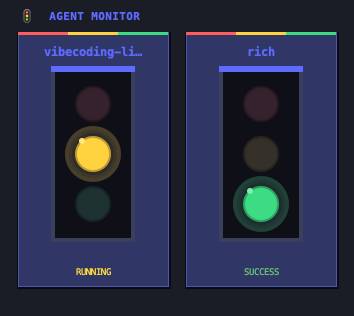
干脆写了个小工具,叫 agent-traffic-light,挂在桌面角落,每个 agent 会话一张三色灯卡片:
- 🟡 黄 = 运行中
- 🟢 绿 = 成功
- 🔴 红 = 失败
- ⚫ 灰 = 进程已经死了
窗口无边框、置顶、可拖拽,双击退出。
长什么样


怎么做的
非常轻量,只用 Python 3 自带的 tkinter ,零第三方依赖。
原理:
- agent 在状态切换时(开始 / 成功 / 失败)调一下
python main.py run <project_name>,发个 UDP 包给桌面端 - 桌面端监听
127.0.0.1:18888,收到包就更新对应卡片 - 每 3 秒检查一次卡片绑定的 PID ,进程没了自动标灰
怎么接入
Claude Code 和 Codex 都是改一个 hook 配置文件的事:
{
  "UserPromptSubmit": [
    {
      "hooks": [{"type": "command", "command": "/usr/bin/python3 /path/to/main.py run $(basename $PWD)"}]
    }
  ],
  "Stop": [
    {
      "hooks": [{"type": "command", "command": "/usr/bin/python3 /path/to/main.py success $(basename $PWD)"}]
    }
  ]
}
卡片名用 $(basename $PWD),所以同一个项目目录的会话会自动归到同一张卡。
跑起来
Mac 自带 Python + tkinter ,不用装任何东西,开箱即用:
git clone https://github.com/stars1324/agent-traffic-light
cd agent-traffic-light
python3 main.py
GitHub 地址: https://github.com/stars1324/agent-traffic-light
多窗口并行确实舒服很多,不用一直盯着终端看哪个挂了

 Select Language